Here describe several DNN related subjects covered by Evo engine.
DNN Devices
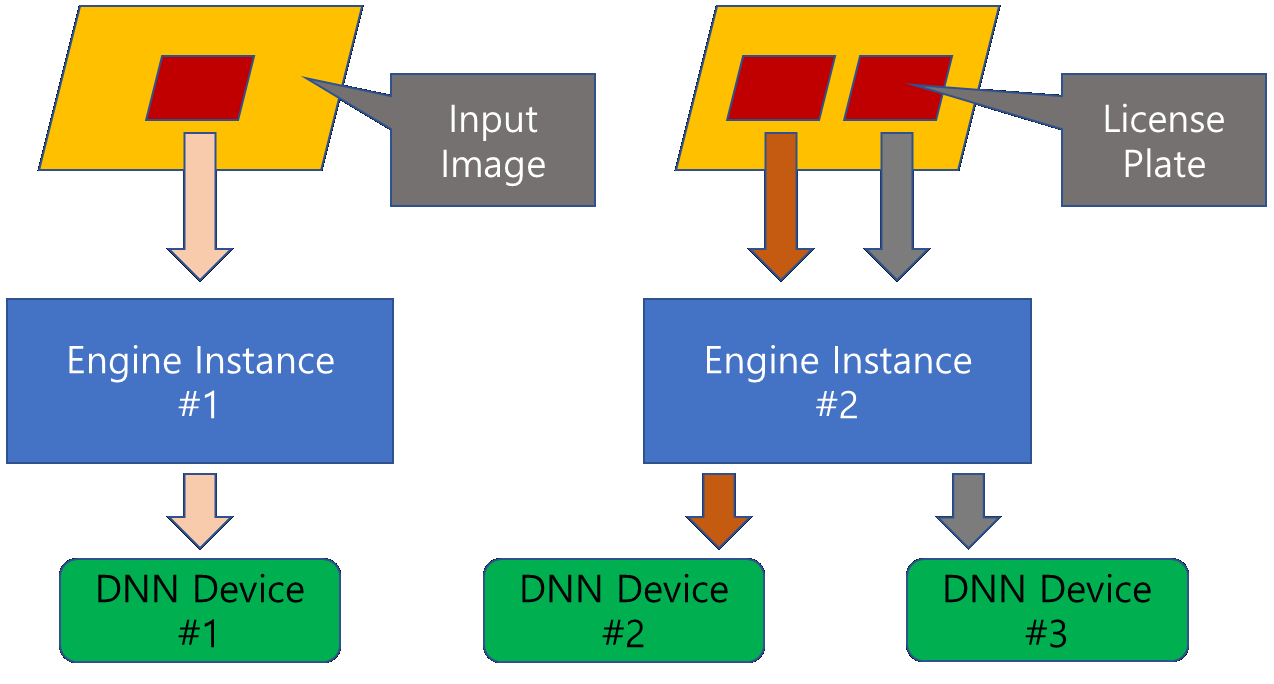
- Evo engine supports several kinds of devices on which DNN models can be run. As such devices, there are typical CPU and GPU(iGPU/dGPU). These devices can be assigned to not only different engine instances but also the same ones. The following image shows an ideal use case of DNN devices.
- Warning
- The kinds of DNN devices supported by Evo engine can be changed depending on its version without notification.
DNN Model Precisions
Evo engine provides several inherent DNN models which are run on supported DNN devices. They are trained with high precision beforehand and included in the SDK package. The problem is that not only runtime precisions supported and prefered by each DNN device can be different but also they can't be the same as the storage formats. To make problem simplified, we created 'normal'/'compressed' formats for storage and 'accuracy'/'performance' modes for runtime. From a precision point of view, their differences are summarized in the following tables.
Precision normal FP32 compressed I8 normal compressed accuracy FP32 FP32, I8 performance FP32, FP16, BF16 FP32, FP16, BF16, I8
- Note
- The precison which is actually used at runtime is determined by the DNN device into which the model are loaded.
- Warning
- The storage format 'compressed' is not implemented yet.
DNN Device Descriptors (DDD)
- DNN Device Descriptor is simple string describing one or more DNN devices with their required model precision and is used when every engine instance is intialized.
- Syntax
- Storage-Format(Runtime-Mode):DNN-Device[,DNN-Device,...]
For examples, 'normal(accuracy):CPU', 'noraml(performance):GPU', 'normal(accuracy):CPU,GPU',
'compressed(accuracy):CPU', 'compressed(performance):CPU', 'compressed(performance):CPU,GPU' ...When there are more than two DNN devices and more than two engine instances, each engine instance can use different DDD but it is recommend that all the instances use the same DDD to distribute the load by themselves.
Possible) instance #1: 'normal(accuracy):CPU', instance #2: 'normal(accuracy):GPU' ...
Recommended) instance #1: 'normal(accuracy):CPU,GPU', instance #2: 'normal(accuracy):CPU,GPU' ...The enumeration order of DNN devices in the descriptor has special meaning when more than two devices are used. For example, assume the same DDD 'normal(performance):CPU,GPU' is used for the two engine instances. When an input arrives, ready instance processes it using CPU. Meanwhile, if new one arrives before the old one has been completed another instance will process it using GPU.
DNN Run Modes (DRM)
- There are two modes to run DNNs, Latency-Oriented and Throughput-Oriented. The former uses all the execution units (in case of CPU, all the cores) to process single input image. However the latter splits them into several groups and process single one per each group in parallel.
- Latency-Oriented vs. Throughput-Oriented
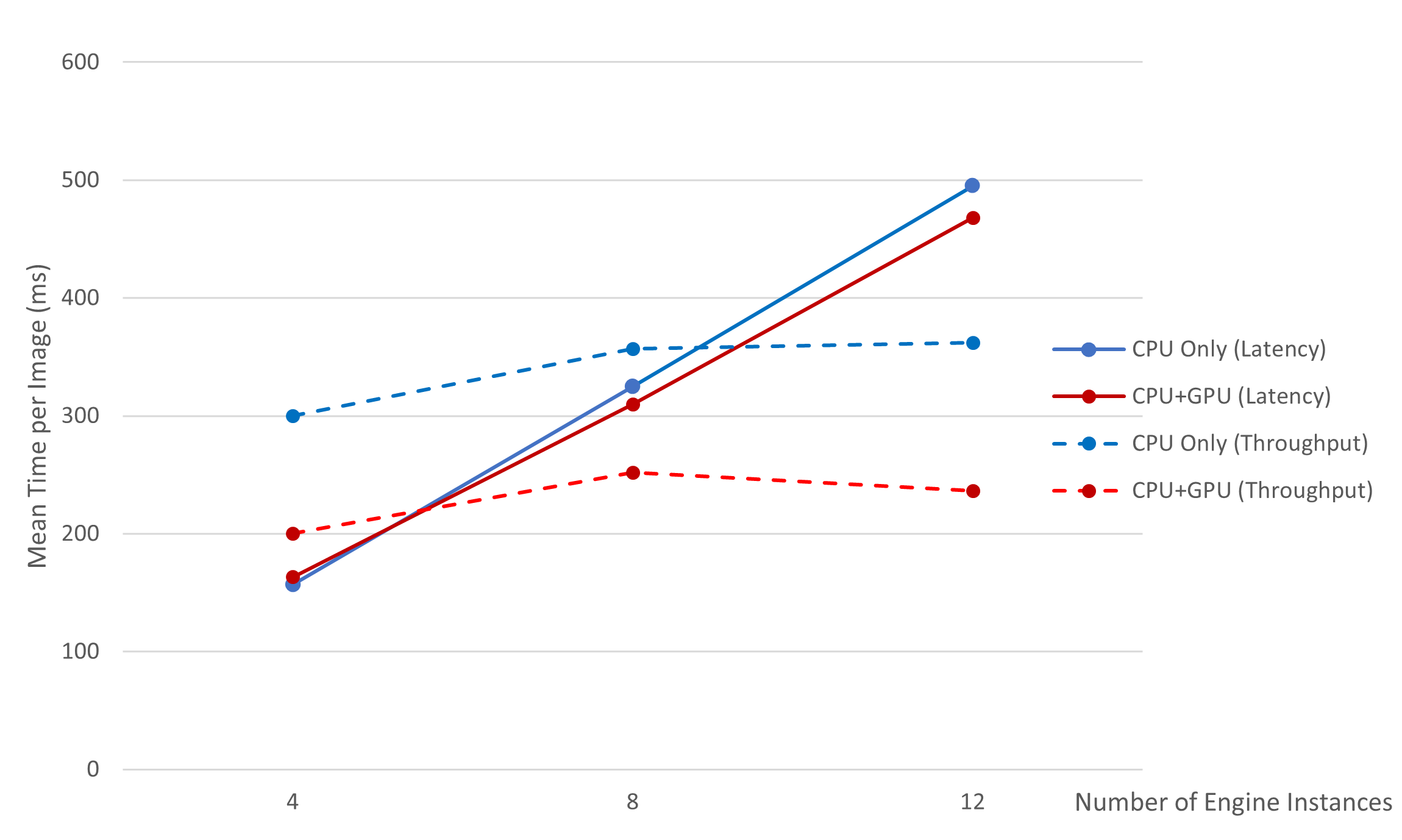
- Latency-Oriented mode is optimized to processing single input image or a few concurrent ones on single or several engine instances, on the other hand, Throughput-Oriented mode is optimized to processing as many concurrent ones as possible on multiple instances. Therefore, appropriate mode must be selected depending on the application environment. Following graph shows test results with respect to concurrent multiple engine instances using Intel's Core 13700K processor and about 400 sample images.
- Syntax
- DRM[:parameter(value)[,parameter(value),...]]
- Note
- Upper/lower cases are distinguished and no white space is permitted.
DRM field in the descriptor can become 'latency' or 'throughput' which represents the Latency-Oriented or Throughput-Oriented mode respectively. The parameter fields support currently only 'cpu_threads' to set number of CPU threads which are mobilized to run DNN models. Its default value is '0', which means the number suitable for current system is delegated to the engine. Examples are as follows.
Good) 'latency', 'latency:cpu_threads(5)', 'throughput', 'throughput:cpu_threads(10)' ...
Bad) 'latency:', 'latency:cpu_threads', 'throughput:cpu_threads()' ...In case there are more than two engine instances, the parameter 'cpu_threads' means number of threads shared by all the instances.